Bigger text, fewer unknown callers, easier contacts, and a home screen that holds only what you use.
A phone arrives set up for a twenty-five-year-old with perfect eyesight who enjoys notifications. Almost every complaint people have about their phone is a setting, not the phone itself.
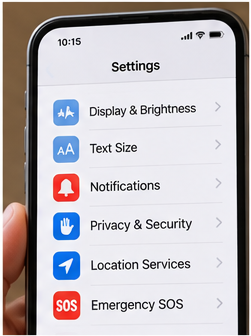
Here are six worth changing. You don’t need to memorize where anything lives: open Settings and use the search box at the top, then type the words in bold. That works on both iPhone and Android, and it survives the updates that move menus around.
1. Make the text bigger
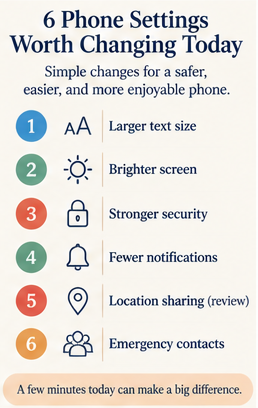
Search for text size. Most phones offer both a size slider and a bold-text switch, and using both together is far more readable than either alone.
If the text is still small at the largest setting, look for display zoom or display size, which enlarges buttons and icons as well as words.
Set it larger than you think you need, live with it for a day, then adjust. Almost nobody goes back down.
2. Silence calls from numbers you don’t know
Search for silence unknown callers on an iPhone, or caller ID and spam on Android.
Calls from numbers not in your contacts go straight to voicemail. Your phone stops ringing at dinner, and anyone with a real reason to reach you leaves a message.
If that feels too strict, turn on spam filtering alone and keep the ringer for everyone else.
3. Put your emergency information on the lock screen
Search for medical ID on an iPhone, or emergency information on Android.
You can list medications, allergies, and emergency contacts so paramedics can see them without unlocking your phone. It takes ten minutes, it’s private day to day, and it matters exactly once.
While you’re there, add the people you’d want called to the emergency contacts list.
4. Make your key people reachable in one tap

Two settings do this.
Search for favorites in the Phone app and add the four or five people you call most. Then search for do not disturb or focus and allow calls from your favorites to ring through even when the phone is quiet.
That combination is the sweet spot: a quiet phone that still rings for family.
5. Clear off the home screen
The first screen should hold only what you use daily: phone, messages, camera, and perhaps two or three more.
On an iPhone, hold an app, choose Remove App, then Remove from Home Screen, which keeps it in the App Library rather than deleting it. On Android, hold and drag to Remove, which takes it off the screen without uninstalling.
Move everything else onto a second screen or into a folder. A home screen you can scan without reading is a phone that feels calmer.
6. Let it update itself
Search for automatic updates and turn them on for both the phone’s software and your apps.
Most security problems on phones come from software that’s months behind. Automatic updates are the one setting that protects you while you’re not thinking about it.
One more, if you take photos
Search for live text or magnifier. The magnifier turns your camera into a reading glass, which is useful for medication labels, restaurant menus in dim light, and the small print on the back of a box.
Publisher’s note: SixtyPlus Journal is published by Zeluraskin LLC, which makes HADORI, a persimmon soap made in Japan. We disclose that on every article rather than burying it in the footer.